 The site has two key sections where information is stored:
First, the site has pages with reference information, such as the calendar and the rank advancement pages. All of the pages are listed in the menu at the top of the site. We try to keep the titles simple and explanatory to help you find what you need.
In the top right of the web site is a search box that lets you enter a search term and look for anything that is available on our site. Search results will show the pages and blog entries that match the search result.
The second section is Troop News. This is a blog and it updates like a news wire or long scroll. Each time we add a new post it will be at the top and the others will move down. Only the first 15 blog entries will stay visible. The rest will go into the archive. Also, each time we create a post, the entry will be assigned to a category and we also add tags.
The categories and tags are visible in the sidebar, which helps you filter blog entries so you can find all the articles related to a particular term.
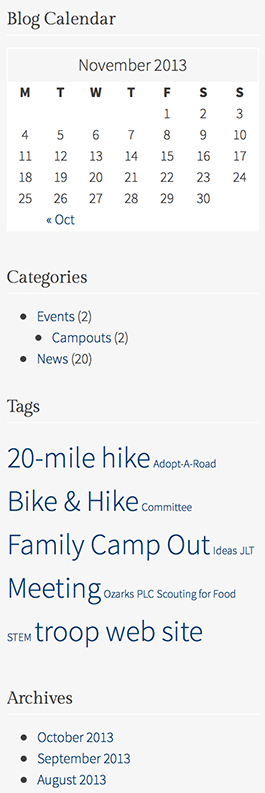
An example of a side bar is shown on the right. It has 4 sections:
- the calendar: this section shows the days in the current month when blog entries were created.
- the categories: this section shows major classifications for blog entries. Each blog belongs to at least one category, such as campouts or Court of Honor, etc. A blog entry could also be just plain old news … 😉
- the tag cloud: a blog entry will include at least one tag. E.g if the entry refers to the bike and hike campout, then the category will be campouts and the tag will be bike and hike. The tag cloud will collect tags entered across all blog entries. Tags that are used more than others will be bigger.
- the archives: every new blog entry automatically is classified by month and this section builds up monthly buckets as blog entries are created.
So, if you don’t see what you are looking for in the pages or the blog entries, the search box in the top right of the sight and the side bar in the Troop News page will help you find information. Remember that the side bar is just for blog entries.
If you still can’t find something, let us know and send an email to our site administrator.

